Container load plan template
A free load plan template in two forms: a spreadsheet that calculates weight and cubic volume as you type, and a printable one page version for the loading dock. No signup, no email required.
The spreadsheet fills in total weight and cubic volume per line and sums both, so you only type dimensions, quantity and unit weight.
What the filled template looks like
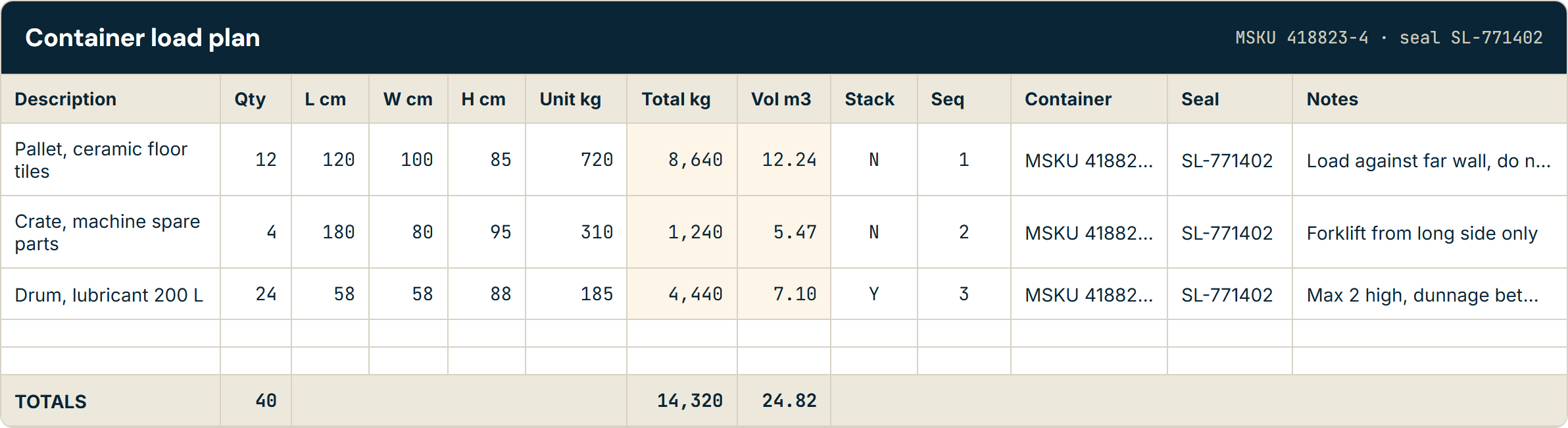
Three cargo lines going into one 40ft container, with the calculated columns shaded. This is the same worked example that ships inside both downloads.
| Description | Qty | L cm | W cm | H cm | Unit kg | Total kg | Vol m³ | Stack | Seq | Notes |
|---|---|---|---|---|---|---|---|---|---|---|
| Pallet, ceramic floor tiles | 12 | 120 | 100 | 85 | 720 | 8,640 | 12.24 | N | 1 | Load against far wall, do not stack |
| Crate, machine spare parts | 4 | 180 | 80 | 95 | 310 | 1,240 | 5.47 | N | 2 | Forklift from long side only |
| Drum, lubricant 200 L | 24 | 58 | 58 | 88 | 185 | 4,440 | 7.10 | Y | 3 | Max 2 high, dunnage between tiers |
| TOTALS | 40 | 14,320 | 24.82 | |||||||
Container and seal number columns are present in the downloads and omitted here for width. A 40ft Standard container carries a maximum payload of 26,580 kg, so this load has headroom on weight and uses roughly 37 percent of the internal volume.
What each field is for
Most load plan templates you find online are a scan of somebody else's form with no explanation attached. Here is what each column is doing and why it matters on the dock.
- Description
- What the line actually is, in words a loader recognises on the dock. "Crate, machine spare parts" beats a part number, because the person checking the plan against the pallet in front of them cannot look the number up.
- Quantity
- Pieces on this line, not pallets and not cartons unless that is the unit you are shipping. Every derived figure on the sheet multiplies through this number, so a wrong quantity quietly corrupts the weight and volume totals.
- Length, width, height
- Outside dimensions of one piece, including the pallet it sits on and any overhang from strapping or shrink wrap. Measuring the goods rather than the loaded pallet is the single most common reason a plan fits on paper and not in the container.
- Unit weight and total weight
- Unit weight is one piece. Total weight is unit weight times quantity, which the spreadsheet calculates. Keep both: the carrier needs the gross figure, and the loader needs to know whether one person can move a piece.
- Volume
- Cubic metres for the line, calculated as length times width times height times quantity, divided by 1,000,000. Compare the total against the container's internal volume to see how much air you are paying to ship.
- Stackable
- Whether anything may be placed on top. This is the field that decides whether your volume total means anything: a container of non-stackable cargo runs out of floor long before it runs out of cubic metres.
- Loading sequence
- The order pieces go in, which is the drop order reversed. The first delivery must be nearest the doors. On a multi-drop run this column is the difference between a five-minute delivery and unloading half the trailer onto the kerb.
- Container or trailer
- Which unit each line travels in. Needed the moment a shipment splits across more than one container, and it is what turns a cargo list into an actual plan.
- Seal number
- Recorded at the moment the doors close, because it is the evidence that the container has not been opened in transit. Customs, the carrier and your insurer all reference it, and it is unrecoverable after the fact.
- Notes
- Handling instructions the numbers cannot express: which side to fork from, what must not be turned on its side, where dunnage goes.
Axle groups on a road leg
If any part of the journey is on a truck rather than a vessel, total weight is only half the compliance question. Legal limits apply per axle group as well as to the vehicle overall, and axle loads depend on where the cargo sits along the deck. A trailer can be comfortably under its gross limit and still be over on the drive axle, because the heavy lines all went in at the front.
That is why the loading sequence column is worth filling in properly rather than treating as paperwork. If you are planning a road leg, put your line weights and their positions through the free axle load calculator before the truck is loaded, not after it is weighed.
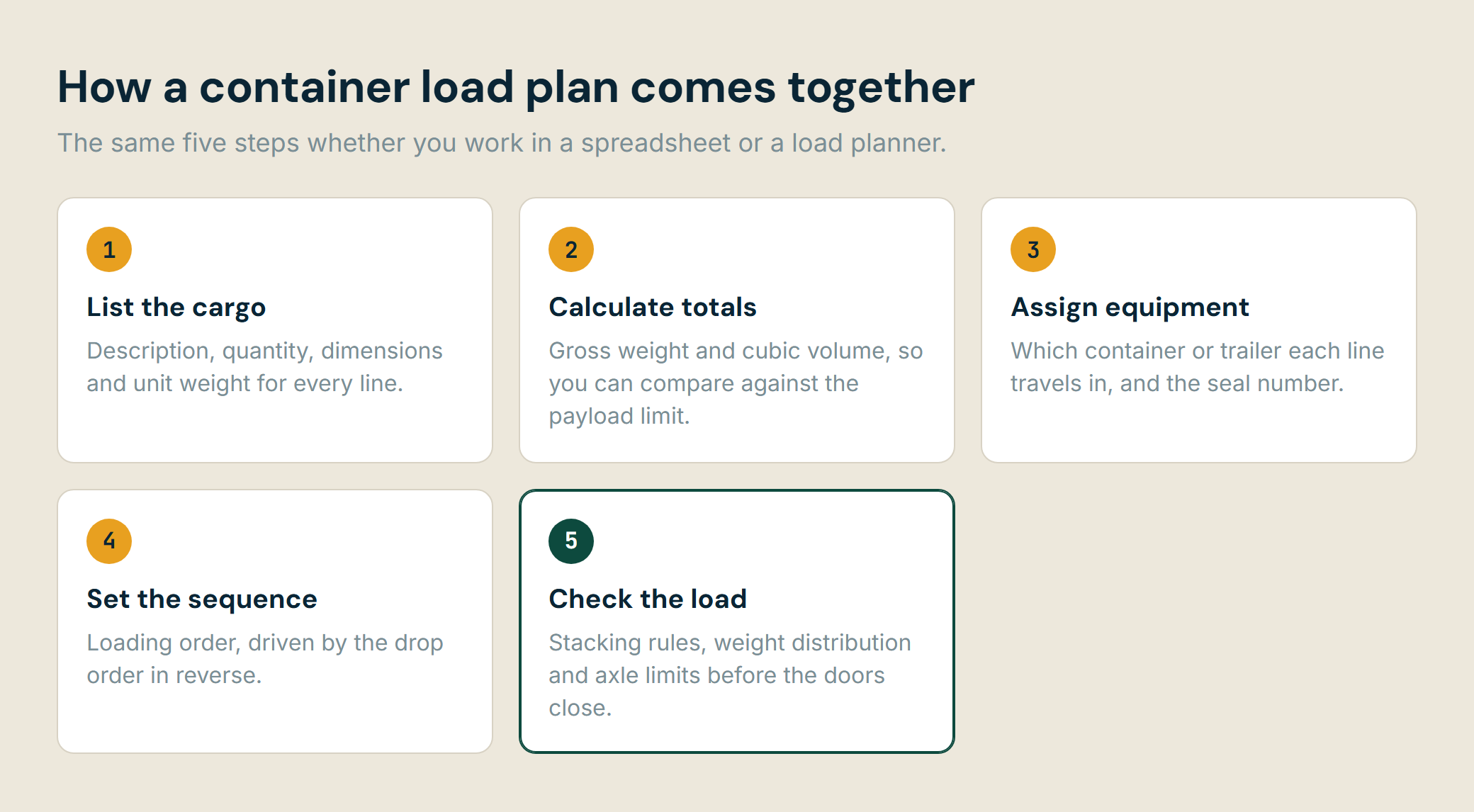
How a load plan comes together
Where a manual template stops working
A spreadsheet is genuinely the right tool for a straightforward load, and plenty of freight ships on exactly this form every day. It has four specific limits, and they are all about the same thing: a spreadsheet records decisions, it does not make them.
Stacking rules across mixed cargo
A spreadsheet can record that a line is non-stackable. It cannot work out what that means once you have eleven lines, some of which can take two tiers and one of which can take nothing. The volume total keeps saying the load fits while the floor has already run out.
Recalculating when a line changes
One quantity changes and every downstream decision changes with it: how many containers, which container each line sits in, the loading sequence, the axle split. The formulas update. The plan they were supporting does not.
Weight distribution across axles
A road leg can be inside the gross weight limit and still be illegal, because axle loads depend on where the cargo sits rather than how much of it there is. A total-weight column cannot see position, so it cannot see this at all.
Knowing whether it fits before the container arrives
Volume utilisation of 85 percent is a reasonable target and a poor prediction. Whether a specific set of boxes fits a specific container depends on their shapes and the order they go in, which is a packing question, not an arithmetic one.
If none of those bite on your shipments, the template above is all you need. If two or three of them are costing you rework every week, that is the point where a load planner earns its place.
Using the spreadsheet with the planner
The column headers in the spreadsheet are the ones our importer reads, so a filled-in template can be uploaded straight into the Teuvia planner rather than retyped. Description, quantity, the three dimensions, total weight and the stackable flag all map across. The remaining columns (loading sequence, container, seal number, notes) are load plan paperwork and are ignored on import.
One caveat worth knowing: the total weight column is a live formula, so open and save the file in Excel or LibreOffice before uploading. Spreadsheet formulas carry no stored result until an application calculates them, so an untouched download imports with the weights blank.
Frequently asked questions
What is a container load plan?
A container load plan is the document that records what goes into a container, in what order, and in which position. It lists every cargo line with its dimensions, quantity and weight, assigns each line to a container or trailer, sets the loading sequence, and records the seal number applied when the doors close. It is used by the loading team on the dock, and afterwards as the record of what was actually shipped.
What should a load plan include?
At minimum: a description of each cargo line, quantity, dimensions, unit and total weight, whether the line can be stacked, the loading sequence, which container or trailer it travels in, and the seal number. Most plans also carry a notes column for handling instructions, and a totals row for gross weight and cubic volume so the load can be checked against the container payload before loading starts.
Is there a free container load plan template?
Yes. The spreadsheet and printable versions on this page are free to download with no signup. The spreadsheet calculates total weight and cubic volume per line and sums both, so you only type the dimensions, quantity and unit weight. The printable version is a one page landscape form sized for a clipboard on the dock.
Who prepares the container load plan?
It varies by shipment. On a full container load the shipper or their freight forwarder usually prepares it, since they know the cargo. On consolidated freight the forwarder or the warehouse operator prepares it, because they are the ones combining consignments. Either way the loading team on the dock needs it in hand before loading begins, and the driver needs a copy of the sealed record.
What is the difference between a load plan and a packing list?
A packing list says what is in the shipment. A load plan says where each item goes and in what order it is loaded. A packing list is a commercial and customs document; a load plan is an operational one. They overlap in the cargo lines they describe, which is why the template below carries the fields both need.
Or skip the spreadsheet
Enter your cargo once and see it packed in 3D, with stacking rules, weight distribution and axle limits checked as part of the same plan.
Open the 3D load plannerNo credit card required